
On the tab "Header data" you will find, among other things, information about the request:
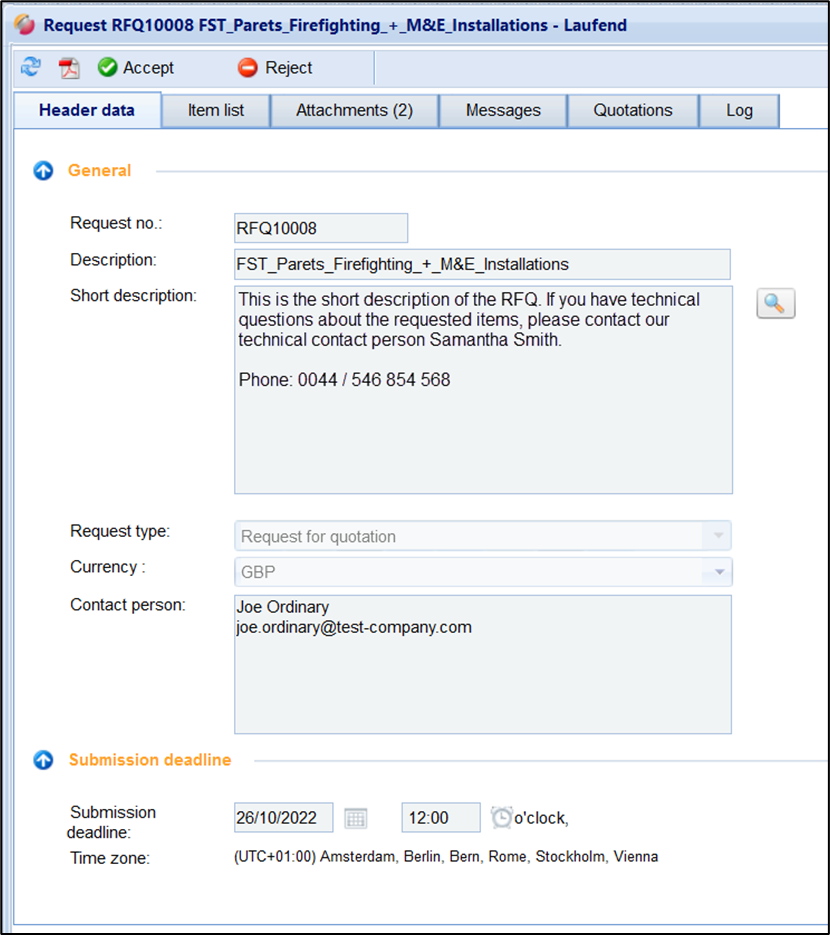
The following information is displayed:
|
Field |
Description |
|
General section |
|
|
Request no. |
Unique Request number |
|
Designation |
Name of the request |
|
Short description |
Description field With the help of the button on the right, the text can be opened in an extra window. As a result, even longer text can be read clearly |
|
Request Type |
e.g., "Cost estimate" |
|
Contact person |
The contact person of the client for this request |
|
Created by |
User who created the request |
|
Created on |
Date when the Request was created |
|
Status |
Status of the Request |
|
Section „Submission deadline“ |
|
|
Submission deadline |
Date and time After reaching the deadline, the Request ends, the Request changes to the status "Closed" Thereafter, it is no longer possible to submit a quotation |
|
Section “Delivery dates / Delivery address” |
|
|
Start date |
Start of service execution (delivery start) |
|
End date |
End of service execution (delivery end) |
|
Name 1 |
Delivery address field |
|
Name 2 |
Delivery address field |
|
Street |
Delivery address field |
|
Zip code |
Delivery address field |
|
Local |
Delivery address field |
|
Delivery conditions |
Delivery conditions defined by the client |